Skip to Main Content
Modules

Build reusable modulesReuse across workflows

Versioned subflows with clear input and output contracts—built once, reused across workflows.

492Available modules
SEMVERVersioned upgrades
I/OTyped contracts
Product interface

Where to Manage All Modules

The module library lists every module you downloaded from the Marketplace. Modules carry an explicit inputs/outputs contract and can be referenced by name in a parent workflow's sub_workflow steps.
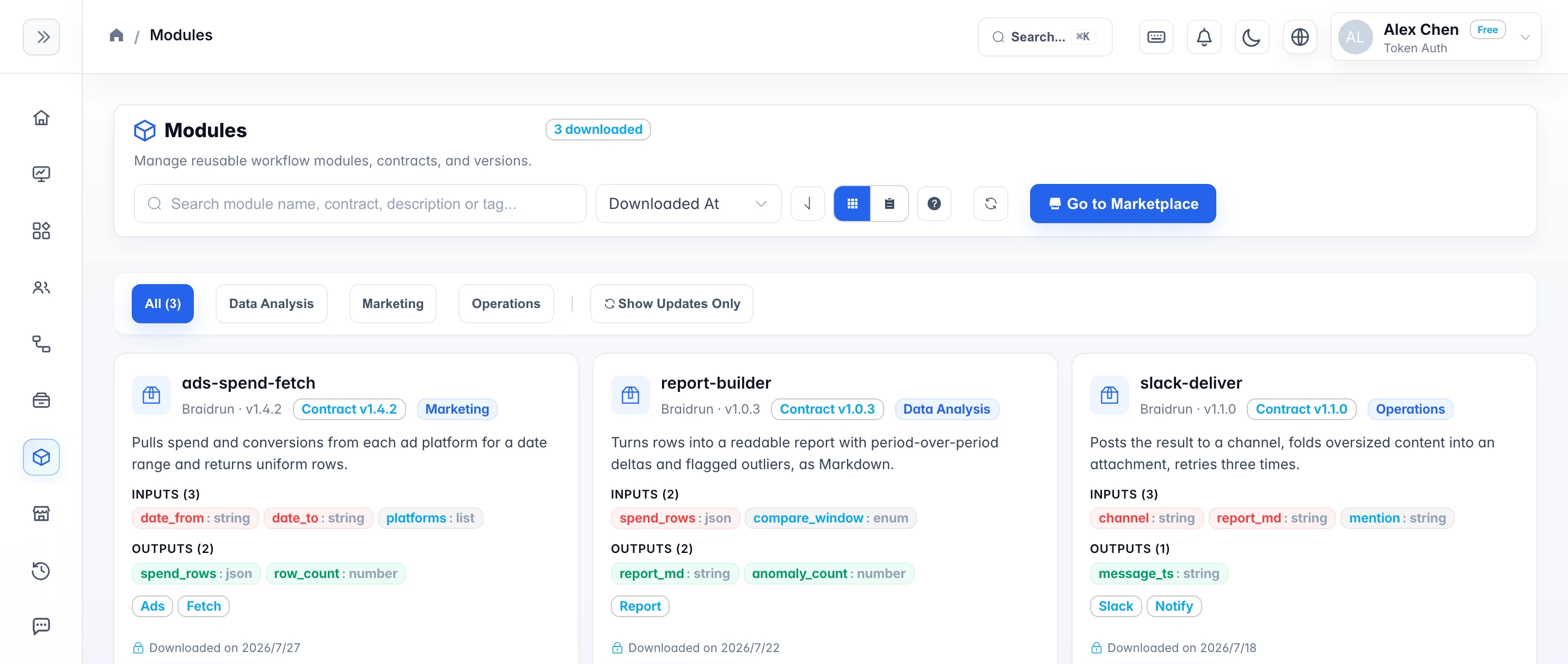
Braidrun module library screenshot
The module library: every installed module lists its input/output contract and which workflows reference it — change it once and every caller picks it up
Module Contract

Module Contract

The only way to pass data across parent and child is inputs / outputs (explicit contract).

INPUTS / OUTPUTS

Module Contract

Parameters that the caller must pass in (with name, type, required, default value, description)

SEMVER

Module Upgrade and Version Compatibility

Check required input, output mappings and references when editing and validating;

SUB_WORKFLOW

How the Parent Workflow Calls the Module

Fill in the module workflow name, or select a specific workflow in the editor.

Built-In Module Library

492 modules: common building blocks like data pulling, report generation, and message delivery are ready-made

utility-*

General-purpose utilities (utility-* prefix, around 140)

The module library ships with 492 built-in modules (platform login, time-window calculation, ASA report pulls, Excel reports, Slack delivery, and more); see

ads-*

Advertising & Attribution

These modules come from real ad-operations work and cover report pulls and attribution data for the major ad platforms. Grouped by purpose:

business-*

Business scenarios (business-* prefix, around 150)

The largest group: ready-to-run business actions around a specific external system — exception sweeps, operations briefings, data syncs. They are named business-module-<service>-<purpose>, so searching by service name is the quickest way to find one.

integration-*

Connection health checks (integration-* prefix, around 70)

Liveness modules map one-to-one to business services and confirm whether a saved connection currently works. Use them as a pre-check at the start of a long flow or schedule them to inspect every connection.

Reuse benefits

Update one module and improve every workflow that uses it

Parent workflows depend only on a module’s public input and output contract. The module can evolve internally while callers review version differences, validate compatibility, and choose when to adopt an update.

  • One capability, many callersReports, alerts, and analysis workflows can share the same module.
  • Version boundaries for upgradesCallers can inspect differences and choose when to upgrade.
  • Traceable referencesSee which workflows use the module and assess impact before changing it.
How it is reused

How the Parent Workflow Calls the Module

  1. How the Parent Workflow Calls the Module Fill in the module workflow name, or select a specific workflow in the editor.
  2. Module Contract Parameters that the caller must pass in (with name, type, required, default value, description)
  3. Module Upgrade and Version Compatibility Check required input, output mappings and references when editing and validating;
  4. Custom Module First organize the logic to be reused into a workflow with clear boundaries and save it.
Start in the Template Library, then add capabilities from the Module Library
Template Library and Module Library are separate app entry points: one manages downloaded complete workflows, the other downloaded reusable modules.