Editor & AI Assistant

Drag on the canvas or write YAML directly—it's the same workflow

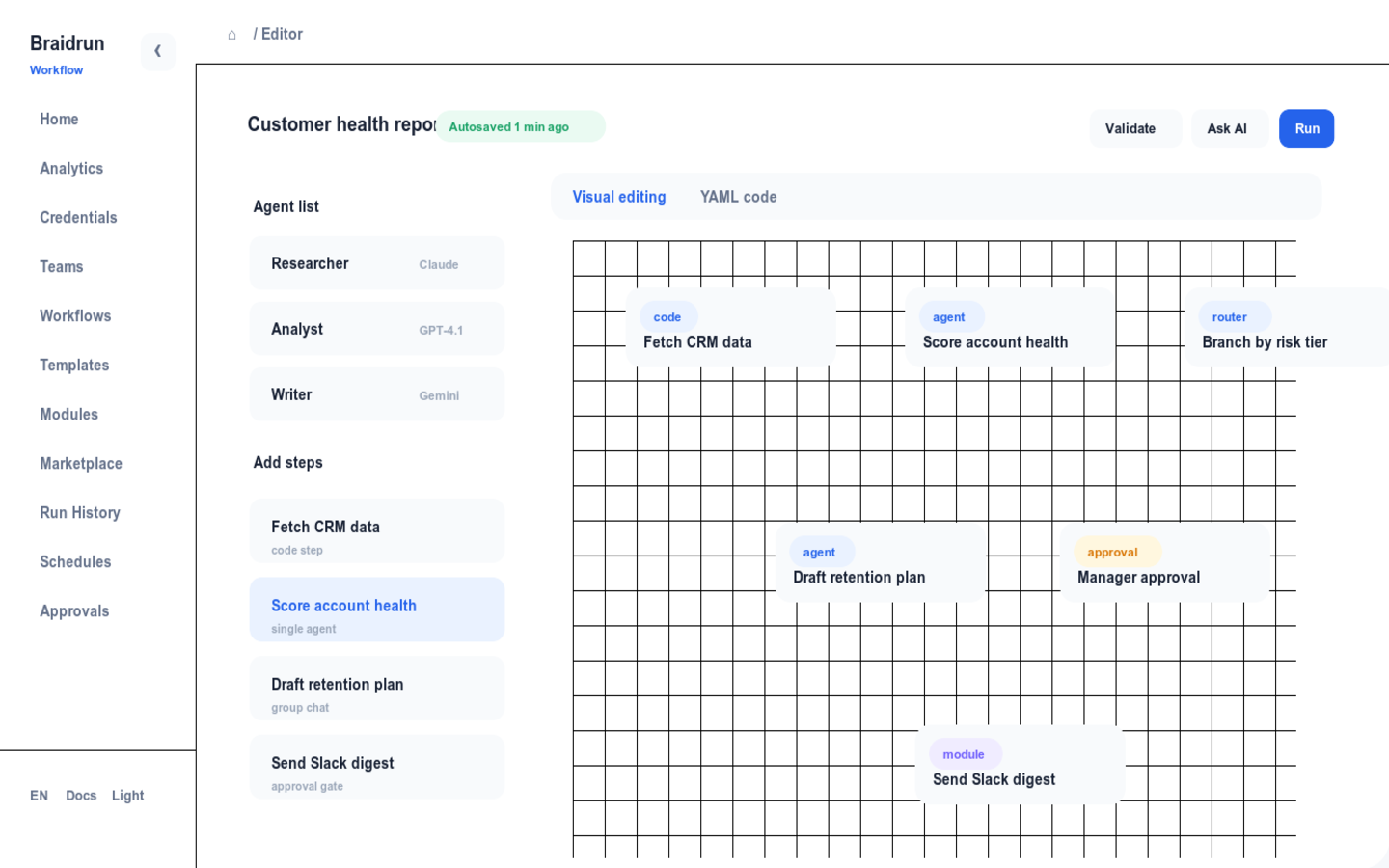
The canvas and YAML are two views of the same definition: drag a node and the code updates; change a line of YAML and the canvas redraws instantly. Every save is a new version you can roll back to anytime.
8 Step TypesCanvas ⇄ YAML two-way syncThree AI assistant runtimes
Braidrun workflow editor screenshot
Editor in action: the canvas and YAML views of the same workflow
Step Type

8 step types to assemble a process

Each step type does one thing; complex processes come from combining them. The Free plan includes the first three; Pro unlocks all 8.

singleFREE
One Agent does one thing: give it a prompt, a model, and tools, and it produces a result.
CodeFREE
Run a script in a Docker sandbox, with 7 languages to choose from including python, typescript, and bash.
classifierFREE
AI first decides which category the input falls into, and the rest of the process branches by category.
group_chatPRO
A few Agents speak in turns around the same question and discuss their way to a conclusion.
agent_basedPRO
A coordinator Agent looks at the current progress and decides which Agent to hand off to next.
state_machinePRO
A long process driven by state transitions, with each move to the next state spelled out clearly.
sub_workflowPRO
Call another workflow as a single step, reusing a mature process directly.
workflow_output_readPRO
Read the results published by another workflow, passing data as a relay between the two.
Step modifiers

Same step, one line of config for different behavior

Modifiers are written directly on the step definition and can be stacked: add retry for automatic retries, add timeout to cut losses when time's up, and add manual_approval to stop and wait for a person.

conditionRuns only when a condition is met; the top level supports && and ||, but not parentheses.
depends_onDeclare upstream step dependencies; runs only once all of them complete.
parallelA batch of steps runs at the same time, none waiting on the others.
retryRetries automatically on failure, with a configurable count.
timeoutTimeouts are treated as failures, so the process doesn't hang.
repeat_untilRepeats until the result meets the bar, such as a score passing the threshold.
iterate_overRuns this step once for each item in a list.
aggregateMerges the outputs of multiple branches into one.
extractExtracts structured fields from the output and stores them in variables.
publish_outputsPublishes the result for other workflows to read.
manual_approvalStops and waits for approval, auto-rejecting on timeout.
Multi-agent orchestration

A few Agents hold a review meeting, and only a passing conclusion moves things forward

group_chat pulls several Agents with different roles into one discussion, speaking in turns and adjourning when a termination keyword is said or the round limit is reached; agent_based has a coordinator Agent decide who to hand off to next. On the right is the full definition of a content-review process.

  • Review meeting: three Agents—copy, fact-check, and brand—take turns finding fault, releasing only once they agree
  • Coordinator: takes the intermediate result, then decides which Agent to go to next—the path doesn't have to be hardcoded upfront
  • Each Agent can use a different model: a cheap one for high-volume analysis, a strong one for the final review
  • A subscription app team's ad keyword review already uses this mechanism: account-level Agents divide the work, keywords are reviewed in parallel batches, up to 5,000 per run
content_review.yamlgroup_chat · manual_approval
# three reviewer agents debate, a human gate before publish- step: write_draft  agent: writer  input: "Draft the release note for {{var:topic}}" - step: review_meeting  group_chat:    participants: [copy_editor, fact_checker, brand_reviewer]    initial_message: "Review the draft. Reply REVIEW_PASSED when aligned."    max_rounds: 4    speaker_selection: round_robin    termination_keyword: REVIEW_PASSED  depends_on: [write_draft] - step: publish  agent: publisher  condition: review_passed == "true" && risk_level != "high"  manual_approval:    enabled: true    timeout: 3600
AI Assistant

Describe what you want done, and a workflow grows on the canvas

The assistant works conversationally inside the editor: you describe the business need, it generates the steps, and you watch and refine.

Conversational GenerationDescribe what you want to automate in a sentence, and as the assistant responds it draws the steps onto the canvas, growing into a complete workflow.
Changes wait for your saveThe assistant's edits don't take effect immediately: they sit in the editor until you confirm and click save to write them into the workflow.
Three RuntimesDrive the assistant with Koog, Claude Code, or Codex—your choice; with a Claude or ChatGPT subscription you can just log in and use it, with no separate API Key to configure.
Doc Q&ANot sure about a platform feature? Just ask—the assistant answers from document retrieval (RAG).
Diagnostics and versions

Mistakes are flagged, and bad edits can be rolled back

Dual LintThe editor checks as you write, and the server validates again before saving, so common definition errors are caught at the save stage.
Undo And RedoCanvas actions support undo and redo, so the cost of trial and error is one keystroke.
Versions And RollbackEvery save creates a new version, and you can diff between versions; if something breaks in production, roll back to the last working one.
Boundaries

Three things to be clear about upfront

  • There's no catalog of hundreds of SaaS connectors: calls to external systems go in code steps or come in as Agent tools; an Agent can connect to any MCP Server.
  • The Free plan offers three step types—single, code, and classifier; all 8 step types and the AI assistant are available on Pro ($49/mo), with the assistant allowing 20 conversations per day.
  • The AI assistant edits but doesn't save: every change takes effect only after you confirm and click save—no silent changes.
Open the editor and build your first workflow
Sign up free to use the canvas and YAML; picking one of 240+ templates to edit is faster than starting from scratch.