Solutions · For decision-makers

The digital employee, clearly explained

A workflow that runs on a schedule with approval gates on key operations is a digital employee—it produces reports, reviews ad campaigns, and replies to reviews every day, and you can see everything it did at each step and how much it cost.

Execution cost recorded per runApproval gating built inSelf-Hosted Deployment Available
A day of operation

A day in the life of a digital employee

Take ad campaigns as an example. This timeline is what "runs on a schedule with approval gates on key operations" looks like in practice.

A person appears just once, at 10:30: a glance at the bid suggestions, with values editable inline; it executes only once approved, and nothing changes on rejection or timeout.

Learn about approval gating →
07:50 · fetch_data
Scheduled trigger pulls yesterday's spend and subscription revenue from two ad platforms
08:00 · daily_report
The daily report goes to Slack: a period-over-period table with AI commentary, ready for the team when they arrive
10:30 · approval_gateHuman moment
Bid suggestions go into the approval queue for your review; values can be edited inline
11:00 · execute_approved
Only approved actions execute, and each one is logged
18:00 · run_summary
An execution summary is delivered: what changed, how many tokens were spent, and how long each step took
Cost

The Numbers Add Up

How many tokens and how much money each run costs is recorded down to the step level; the analytics dashboard is built in, so you don't guess from the month-end bill.

  • Every step's token usage and cost on the execution timeline is recorded per run and queryable anytime
  • After a failure, rerun from a specified step, with completed LLM steps not billed again
  • Spend is controlled through approval gates and maxRuns caps: AI only proposes, write actions need human approval, and chained tasks have a maximum run count
  • The dashboard reports success rate, duration, and usage by workflow, so high-cost processes stand out at a glance
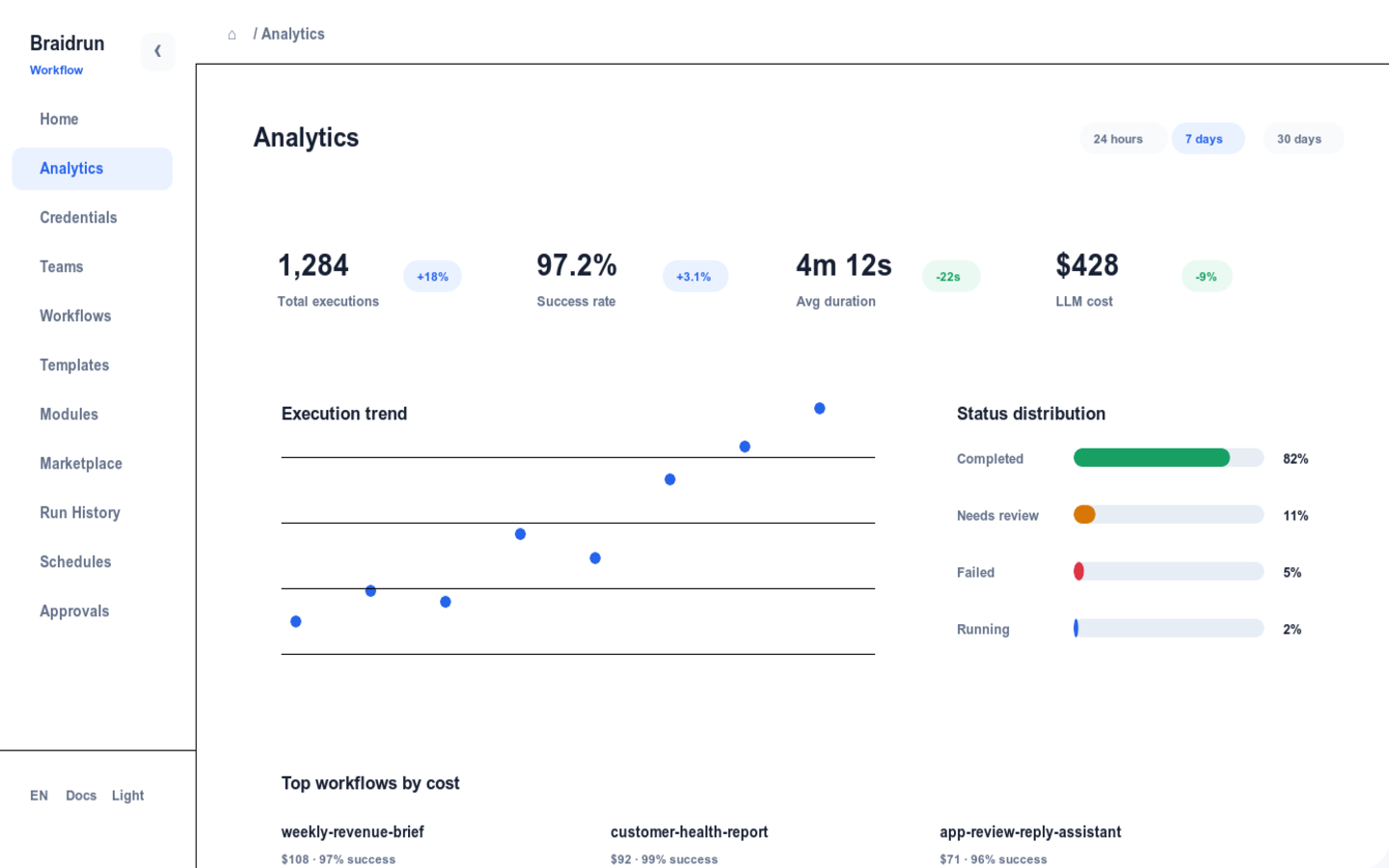
Braidrun execution analytics screenshot
Execution analytics dashboard: success rate, duration, and usage by workflow
Control and compliance

Control built into the product

Each item below is a feature you can turn on right in the product; Enterprise-only ones are marked.

GATEApproval Gates High-risk steps pause to wait for approval and auto-reject on timeout; the approver can edit values inline before approving.
AESCredential Encryption Model and platform keys are stored AES-256-GCM encrypted, with key rotation supported.
LOGAudit Log ENTERPRISEWho changed a process and who approved what is tracked throughout; login can connect to SSO/OIDC.
GDPRData Rights GDPR data export and deletion are built-in product features, so requests can be handled directly.
HOSTSelf-Hosted Deployment ENTERPRISEThe whole system installs into your own infrastructure so data never leaves your boundary; multi-instance horizontal scaling is supported.
BYOKNo Model Lock-In BYOK integration across 15+ providers, with each Agent in a workflow able to use a different model, swappable anytime.
Rollout path

Four stages, from individual use to multi-department scale

No need to roll out company-wide from day one; nail one thing per stage, then move to the next.

01An Individual Using ChatGPTSomeone on the team already uses it daily to write reports and organize data, but the prompts and know-how stay locked in individual chat histories.
What this stage doesPick a process that repeats daily with clear boundaries as the candidate for your first workflow.
02Get your first workflow runningStart from a template, connect credentials and data sources, set a scheduled trigger, and send the output straight to the group.
What this stage doesGet it working in demo mode first, then connect real data and add approval to write actions.
03Multiple team processes, with approval as standardMultiple workflows run on schedules, templates and credentials are shared within the team, and permissions are tiered per person.
What this stage doesBring all high-risk operations under approval gates, and use execution records to review costs regularly.
04Scaling Across DepartmentsMultiple departments each maintain their own workflows, with quotas, permissions, and auditing managed by tier.
What this stage doesEvaluate self-hosted deployment to pull the data boundary into your own infrastructure.
Book a demo, or just start free
The demo explains the mechanics using workflows actually running in production; or sign up for the Free plan first and try a template's demo mode yourself.