Templates, modules, and marketplace

240+ templates, ready to run in one click

demo mode needs no credentials—use sample data to see a full execution first; connect your own model keys and the same workflow becomes a production process.
120+ reusable modulesTry it credential-free in demo modeBYOK across 15+ model providers
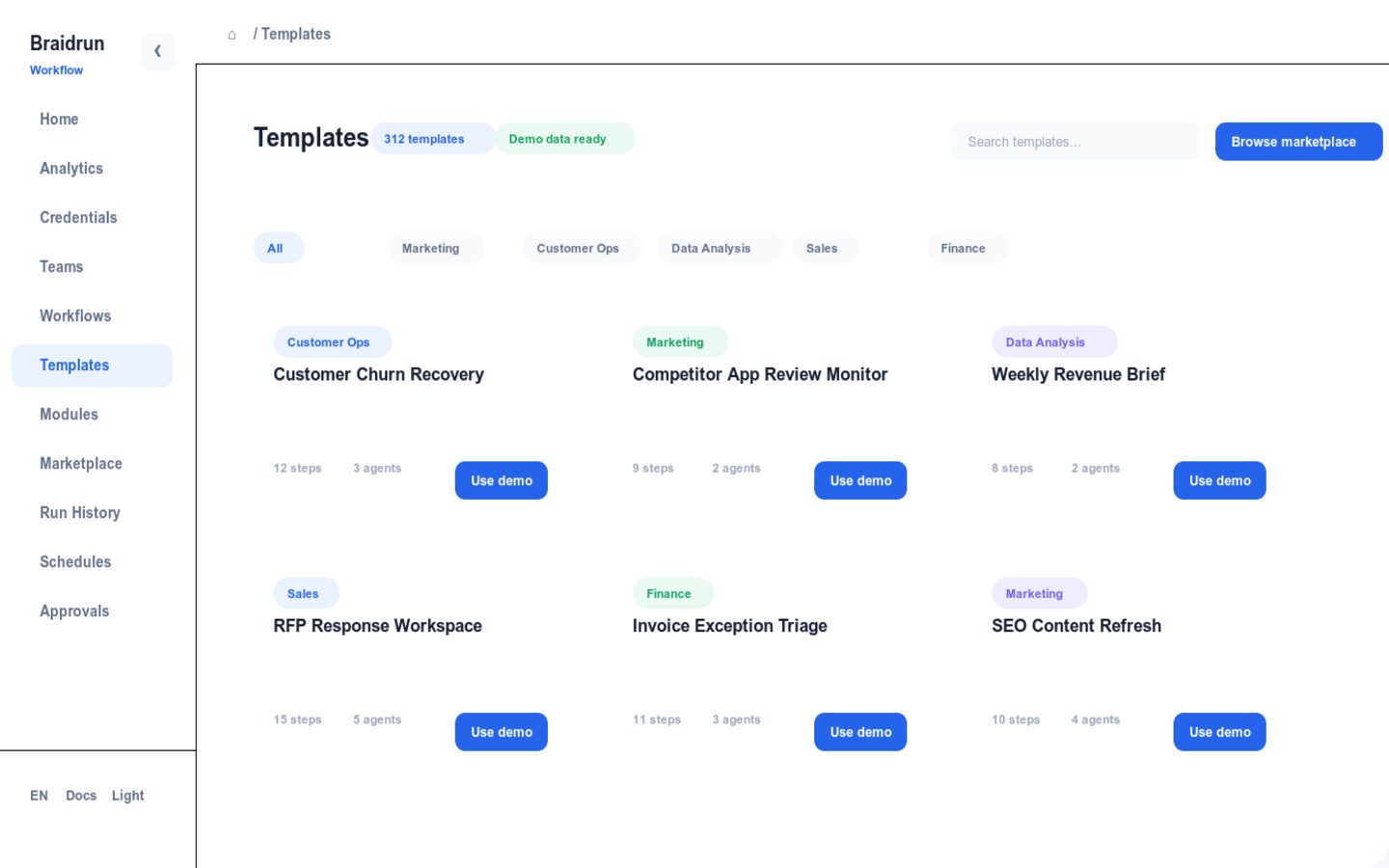
Braidrun template gallery screenshot
The in-product template library: categorized by scenario, with every template runnable on sample data first
How templates work

See results on sample data first, then connect keys to go to production

Pick a template and click Use, and it's copied into your own workflow. From trial run to production, every step's boundary is spelled out.

USEClick And RunTemplates come with default variables, triggers, and Agent configuration. Click Use to copy one into your space, so your first run doesn't require filling in config from scratch.
DEMODemo ModeRun it once without connecting any credentials: sample data walks through the whole process so you can see what each step outputs. To get real business results, connect your own keys.
UPGTemplate UpgradeWhen a template ships a new version, review a preview of the changes before upgrading; the model settings and variables you've changed are preserved, and the new version overwrites only the template's own parts.
Modules and assembly

120+ modules—assemble a process from three snippets of YAML

A module is a versioned, reusable workflow that declares a typed input/output contract; reference it in a process with a sub_workflow step.

  • 120+ modules: common building blocks like data pulling, report generation, and message delivery are ready-made
  • Typed contracts: whether upstream output matches downstream input is checked at save time, so you don't find out halfway through a run
  • Version compatibility checks: when a module ships a new version with a changed interface, it's flagged for your confirmation first; until you upgrade, the old version keeps running
  • The example assembles a daily-report process from three modules: pull spend data, generate the report, and deliver to Slack
daily_report.yaml3 × sub_workflow
# fetch → report → deliver
steps:
- name: fetch_spend
type: sub_workflow
module: ads-spend-fetch@1.4.2
publish_outputs: [spend_rows]
- name: build_report
type: sub_workflow
module: report-builder@1.0.3
depends_on: [fetch_spend]
- name: deliver_slack
type: sub_workflow
module: slack-deliver@1.1.0
depends_on: [build_report]
Agent skills

Equip Agents with ready-made skill packages

A skill is a packaged toolset installed from the skill marketplace; once installed, the Agent can call its capabilities directly.

DOCOffice Document GenerationDocument-generation skills for Word, Excel, PPT, and PDF: the Agent writes results into proper files that ship straight through the workflow.
APIVertical-Domain SkillsSkill packages for specific business domains: for example, the App Store Connect skill covers 192 resource endpoints, so the Agent can query reviews and run TestFlight distribution directly.
USERPer-User Install And ToggleSkills are installed from the marketplace and turned on or off per user; within one team, different members can use different skill combinations.
Publishing and marketplace

Publish the templates you've polished

Both templates and modules can be published to the marketplace; when someone installs, dependencies resolve automatically and everything installs at once.

PUBPublish Templates And ModulesTurn a workflow you've got running smoothly into a template or module, add documentation, and publish it to the marketplace; others can install it into their own space with one click.
VERVersioned PublishingEach publish is a new version. Users can stay on an old version and keep running, or read the change notes and then upgrade.
DEPAutomatic Dependency ResolutionWhen you install a template, the modules it references are resolved by version and installed together automatically—no hunting down dependencies one by one.
Multi-Model BYOK

15+ model providers, and the keys are yours

Connect your own API Key or subscription account straight to a provider; a single workflow can mix models from several vendors.

15+15+ ProvidersDirect connections to 15+ providers, including OpenAI, Anthropic, Google, DeepSeek, Kimi, Zhipu, xAI, Mistral, and OpenRouter.
1919 Agent Presets19 built-in Agent presets; create a new Agent from a preset, then adjust the model and prompt as needed.
MIXEach Agent picks its own modelWithin one workflow, use a cheap model for high-volume analysis and the strongest for the critical final review; cost is recorded per step.
LOCALLocal Model IntegrationBoth Ollama and LM Studio can be added as providers, so model calls hit your own inference service.
SUBSubscription-Login BYOKWith a Claude Pro or ChatGPT subscription, you can log in and reuse it directly, without requesting a separate API Key for workflows.
AESEncrypted Credential StorageModel keys are stored AES-256-GCM encrypted, with key rotation supported.
Pick one from the template library and run it on sample data first
240+ templates categorized by scenario, with demo mode requiring no credentials; sign-up is free, and connecting keys turns it into a production process.